Michelangelo Serving
Michelangelo provides a unified way to deploy and serve ML models on Kubernetes. This guide covers the architecture, controller lifecycles, and core concepts that operators and contributors should understand.
What Is Michelangelo Serving?
Michelangelo Serving is a control plane for managing ML model serving infrastructure. It handles the complete lifecycle of inference servers and model deployments, from provisioning to traffic routing to cleanup.
Users define what to deploy, and Michelangelo handles:
- Provisioning inference server infrastructure (Deployments, Services)
- Managing model configurations
- Routing traffic to the correct models
- Health monitoring and status reporting
- Automatic cleanup on deletion
Architecture
The image below displays the Michelangelo (MA) architecture for deploying and running inference on a model.
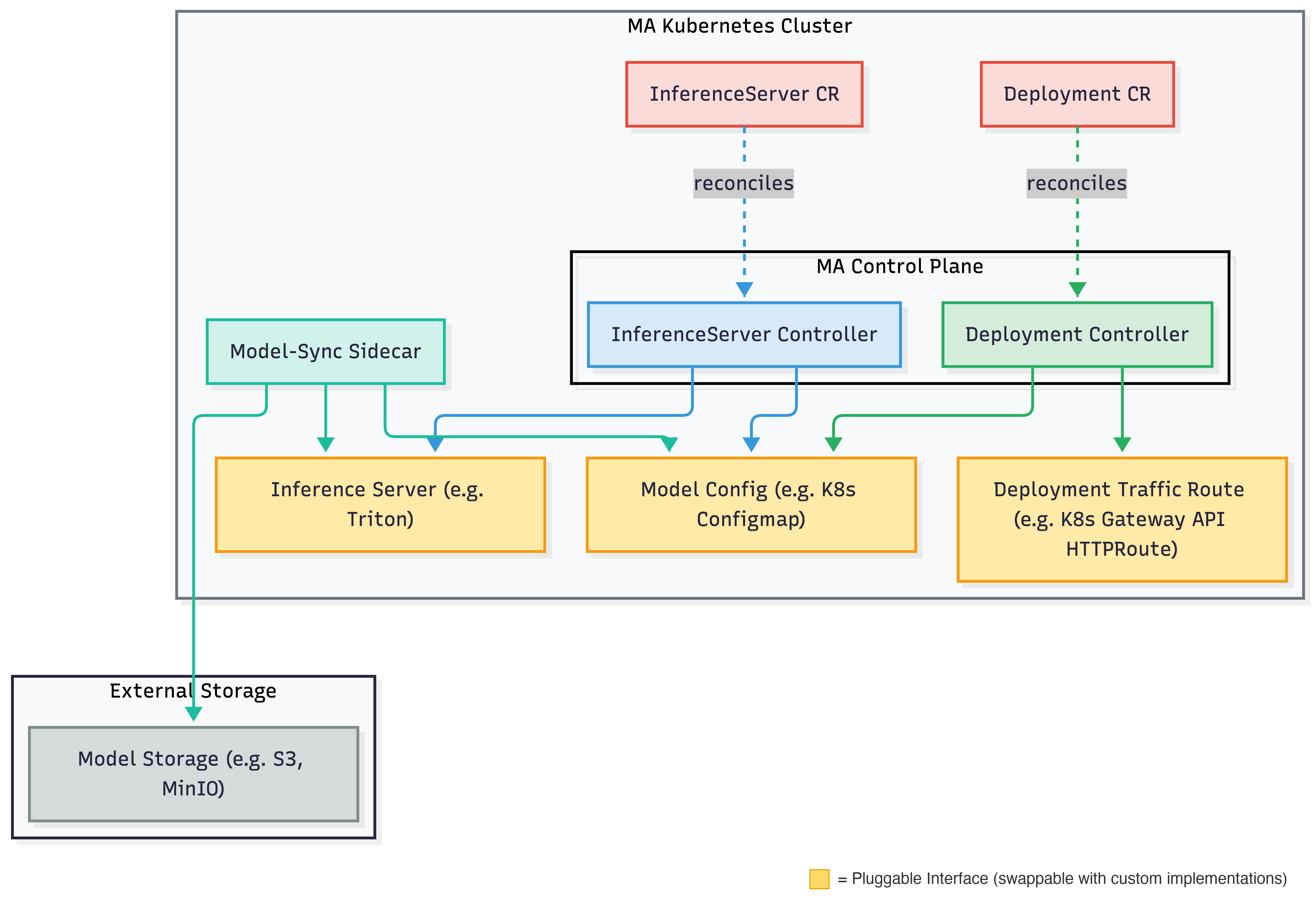
The system uses a sidecar approach for model management: a model-sync sidecar daemon watches the model configuration and handles the actual loading and unloading of models on the inference server.
How Serving Works
InferenceServer Lifecycle
The InferenceServer controller manages the infrastructure that serves models:
- Create User submits an InferenceServer resource.
- Provision Michelangelo provisions the inference server infrastructure.
- Health Check The system monitors deployment readiness and server health.
- Serve Once healthy, the server is ready to load models.
- Delete On deletion, all resources are cleaned up.
Deployment Lifecycle
The Deployment controller manages model rollouts to inference servers:
- Validation Michelangelo validates the model and target server.
- Asset Preparation Model artifacts are staged for loading.
- Resource Acquisition Model is added to the inference server's Model Config.
- Model Traffic Routing Endpoint Routes are created to expose the model.
- Completion The model is fully deployed and serving.
Rollout Stages
| Stage | Description |
|---|---|
| Validation | Verify model and server configuration |
| Asset Preparation | Stage model artifacts |
| Resource Acquisition | Add model to server config |
| Model Traffic Routing | Configure network routes to the deployed model |
| Rollout Complete | Model is live |
If issues occur, the system automatically rolls back:
| Stage | Description |
|---|---|
| Rollback In Progress | Reverting to previous model |
| Rollback Complete | Previous model restored |
Core Concepts
InferenceServer
An InferenceServer represents the infrastructure for serving models. It includes:
- Backend Type: The serving framework (Triton, vLLM, etc.)
- Resource Spec: CPU, memory, GPU requirements
- Replicas: Number of server instances
Deployment
A Deployment represents a model being served on an inference server. It includes:
- Target Server: The InferenceServer to deploy to
- Model Revision: The model version to serve
- Rollout Strategy: How to deploy (progressive or emergency)
Model Config
The model config stores the list of models to be loaded on an inference server. It acts as a decoupling layer between the controllers and the inference server itself so that controllers never need to interact with the serving framework or storage backends directly. The InferenceServer controller owns the model config lifecycle (creation and deletion), while the Deployment controller manages individual model entries (adding and removing models during rollouts and rollbacks). The model-sync sidecar watches this config and reconciles the inference server's state by downloading models from external storage and loading or unloading them via the serving framework's API. Example implementation: Kubernetes ConfigMap.
Traffic Route
Traffic routes manage traffic routing from the gateway to specific models on the inference server. Example implementation: Gateway API HTTPRoute.
Next Steps
- Run Inference on a Local Sandbox: Try inference in a local development environment
- Integrate with Your Custom Backend: Add support for new serving frameworks