Michelangelo Jobs
Michelangelo provides a unified way to run large-scale data processing and ML training jobs on Kubernetes, using Ray and Spark as execution engines. This guide explains the core concepts, how jobs run, compute is allocated, and how users interact with the system.
What Is a Michelangelo Job?
A Michelangelo job is any workload—training, batch inference, ETL, feature generation—that runs on a managed compute cluster. Users define what to run, and Michelangelo handles:
- Selecting a compute cluster
- Creating the necessary Ray or Spark resources
- Running the workload
- Streaming logs/status
- Cleaning up when finished
You focus on the job logic; Michelangelo manages the infrastructure.
Architecture
The image below displays the Michelangelo (MA) architecture for running Spark and Ray batch jobs end-to-end: submission, scheduling, execution, and reporting.
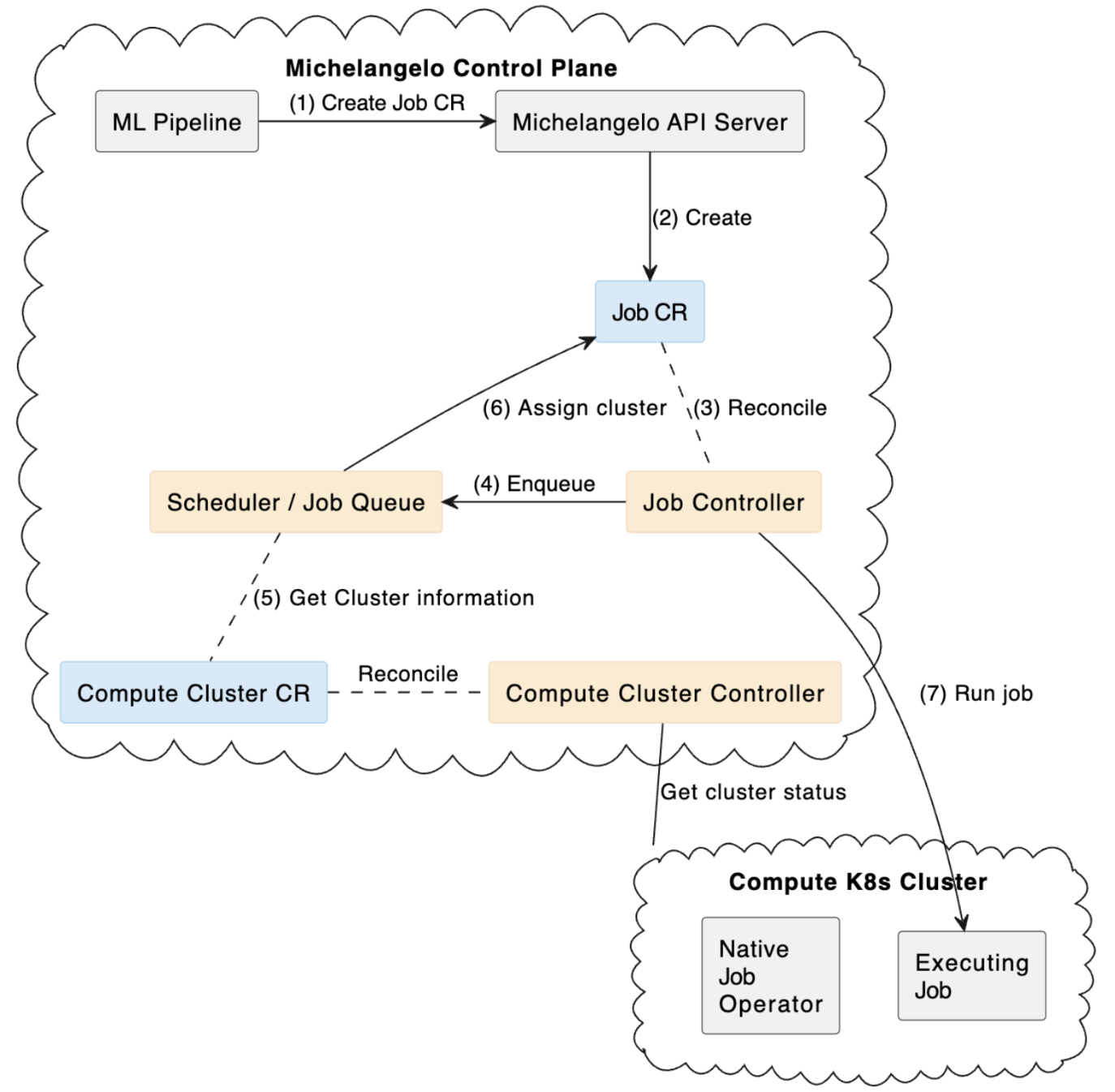
How Jobs Run
The execution flow is very similar across Ray and Spark:
- Submit Your pipeline or service submits a job request to Michelangelo.
- Schedule & Assign Michelangelo chooses a compute cluster based on quotas, resource needs, and policies.
- Materialize on Compute
The system creates the appropriate resources in the target cluster:
- Ray:
RayCluster+RayJob - Spark:
SparkApplication
- Ray:
- Execute the Workload The job runs on the generated compute cluster. Autoscaling brings up or down workers as needed.
- Monitor & Complete Michelangelo collects logs, metrics and job status. After completion, compute resources follow retention/TTL policies.
This mirrors the same control-plane to compute-plane flow seen in platforms like Databricks and Kubeflow.
Choosing Ray or Spark
| Engine | Best For | Why |
|---|---|---|
| Ray | ML training, Python-native preprocessing, GPU workloads | Flexible execution, actors, distributed training, great for deep learning |
| Spark | Large-scale ETL, SQL/DataFrame pipelines, joins/aggregations | Mature, optimized shuffle engine, strong SQL performance |
A simple rule:
- If your workload is Python/ML/GPU → use Ray
- If your workload is SQL/ETL/joins → use Spark
What You Need to Specify
Michelangelo abstracts away most of the details. Users only provide the essentials:
For Ray jobs
- The container image with your training code
- The entrypoint (e.g.,
python train.py) - Desired head/worker compute sizing
- Optional: min/max workers for autoscaling
For Spark jobs
- Your application file (Python or JAR)
- Application arguments
- Driver/executor resource sizes
- Optional: dynamic allocation configuration
Observability & Operations
Michelangelo automatically provides:
- Job status and lifecycle events
- Logs from driver/head + workers
- Optional access to Ray Dashboard or Spark UI
- Automatic cleanup via TTL policies
Retries, check-pointing, and error handling depend on your application code.