Platform Setup Guide
This guide describes how to configure Michelangelo server components in Kubernetes cluster. It focuses on the configuration surfaces (ConfigMaps, fields, and key parameters).
Overview
Michelangelo consists of four core server components:
- API Server – Central gRPC API
- Controller Manager – Kubernetes controllers
- Worker – Workflow execution (Temporal workers + compute integration)
- UI + Envoy – Frontend and proxy
Each component exposes server-side configuration through ConfigMaps and overlays.
This document explains:
- Where each component's configuration lives
- What fields can be customized
- What each field means
- How to apply changes using Kustomize overlays
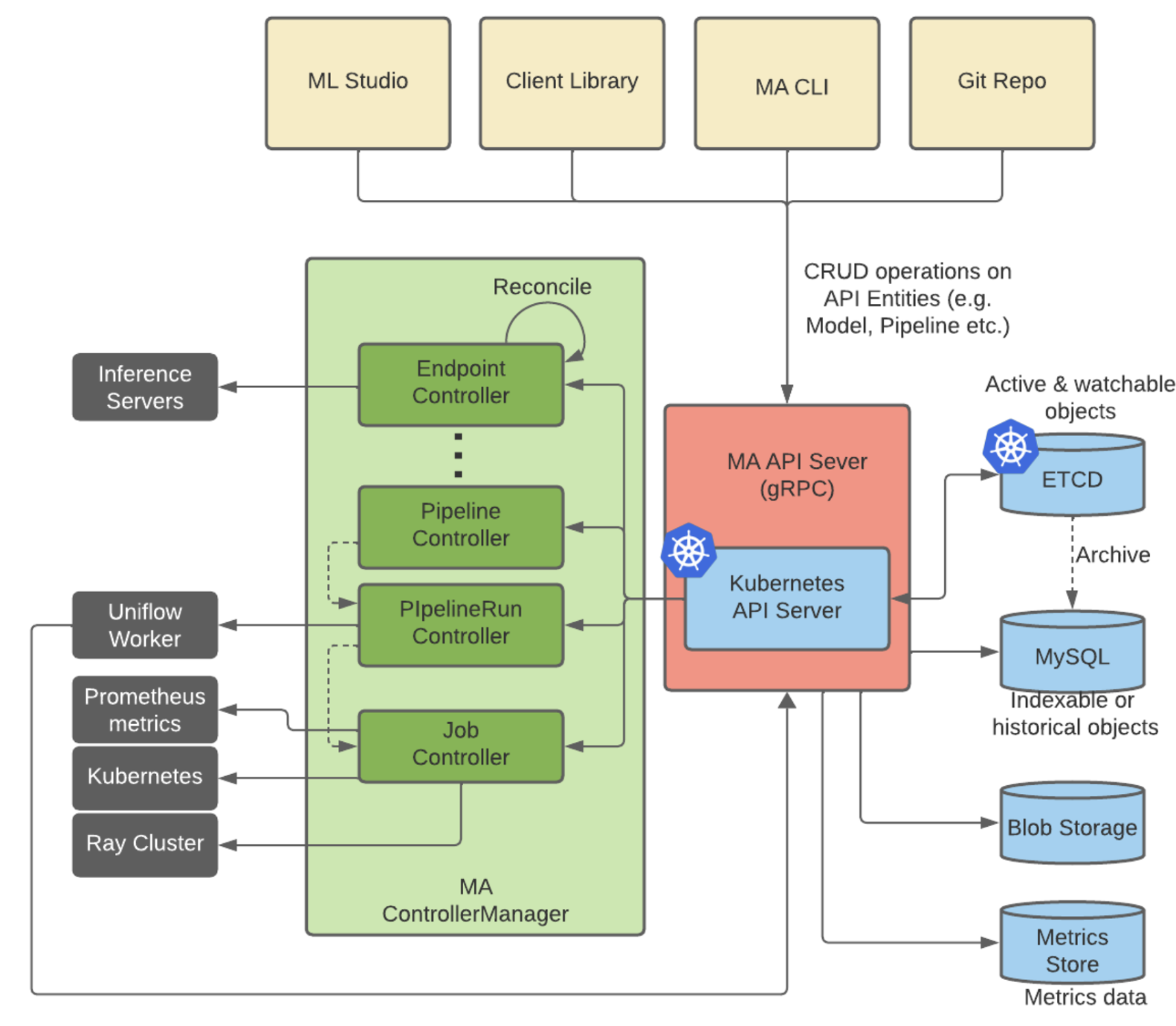
Michelangelo Service architecture diagram
The following diagram shows the relationship between each of the services in Michelangelo eco-system.
Server Configuration
API Server Configuration
Key Fields
apiserver:
  yarpc:
    host: 0.0.0.0
    port: 15566
  k8s:
    qps: 300
    burst: 600
  metadataStorage:
    enableMetadataStorage: false
  crdSync:
    enableCRDUpdate: true
    enableIncompatibleUpdate: false
Field Explanations
| Field | Description |
|---|---|
yarpc.host/port | gRPC bind address + port |
k8s.qps/burst | Throttling limits for Kubernetes API calls |
enableMetadataStorage | Enables metadata persistence |
enableCRDUpdate | Controls whether CRDs can be sync'd |
enableIncompatibleUpdate | Allows breaking CRD changes (use only during major migrations) |
Controller Manager Configuration
Key Fields
controllermgr:
  metricsBindAddress: 8091
  healthProbeBindAddress: 8081
  leaderElection: false
  leaderElectionID: michelangelo.your-organization.com
  port: 9443

controllers:
  rayCluster:
    k8sQps: 300
    k8sBurst: 600

minio:
  awsRegion: ap-southeast-1
  awsEndpointUrl: s3.ap-southeast-1.amazonaws.com
  useIam: true

workflowClient:
  service: temporal-frontend
  host: temporal.your-domain.com:7233
  transport: grpc
  domain: uniflow
Field Explanations
| Field | Description |
|---|---|
metricsBindAddress | Controller metrics port |
healthProbeBindAddress | Health check port |
leaderElection | Enable for production HA |
minio.* | S3 / MinIO backend configuration |
workflowClient.* | Temporal client configuration |
controllers.* | Each controller components' configuration |
Worker Configuration
Key Fields
worker:
  address: michelangelo-apiserver.your-domain.com:443
  maApiServiceName: ma-apiserver
  useTLS: true

logging:
  level: info
  development: true
  encoding: console

workflow-engine:
  host: temporal.your-domain.com:7233
  transport: grpc
  provider: temporal
  workers:
    - domain: default
      taskList: production-uniflow
  client:
    domain: uniflow
Field Explanations
| Field | Description |
|---|---|
worker.address | API server endpoint used by workers |
workflow-engine.host | Temporal endpoint |
workers[].taskList | Worker task list to poll |
client.domain | Temporal workflow domain |
UI & Envoy Configuration
Envoy Proxy
ConfigMap:
static_resources:
  listeners:
    - address:
        socket_address: { address: 0.0.0.0, port_value: 8081 }

  clusters:
    - name: michelangelo-apiserver
      load_assignment:
        endpoints:
          - lb_endpoints:
              - endpoint:
                  address:
                    socket_address:
                      address: michelangelo-apiserver
                      port_value: 15566
Public UI Config
ConfigMap:
config.json: |
  {
    "apiBaseUrl": "https://michelangelo-envoy.<your-domain>"
  }
Environment Overrides / Domain Settings
You must customize domain-specific values in overlays:
| Location | Fields to Update |
|---|---|
| Worker ConfigMap | API server domain, compute domain, Temporal host |
| UI Public Config | "apiBaseUrl" |
| Envoy Config | CORS allowed origins, API cluster hostname |
| Ingress | Hostnames for API server & UI |
| Controller Manager | S3 region, endpoint, Temporal host |
Object Store Configuration
Object storage (MinIO / S3) is used by Michelangelo for artifacts and metadata.
Controller Manager Object Store Settings
These live in the controller manager ConfigMap:
minio:
  awsRegion: sample   # AWS region
  awsEndpointUrl: sample.amazonaws.com
  useIam: true                # Use IAM roles for authentication
Fields
awsRegion– The AWS region of your S3 bucket.awsEndpointUrl– S3 endpoint (s3.amazonaws.comor regional endpoint).useIam– Set totruein production (do not hardcode keys in config).
Storage Setup Checklist (from original guide)
- Configure AWS credentials/IAM roles for pods that need S3 access.
- Verify region and endpoint in the ConfigMap match your S3 setup.
- Test connectivity from worker/controller pods to the bucket.
Workflow Engine Configuration (Temporal/Cadence)
Michelangelo uses a workflow engine (Temporal or Cadence) for orchestrating workflows. Most of your current guide examples use Temporal, and Cadence is used in sandbox/dev.
Controller Manager Workflow Client
From controllermgr-configmap.yaml:
workflowClient:
  service: temporal-frontend    # Temporal service name
  host: temporal.your-domain.com:7233  # Temporal endpoint
  transport: grpc               # Transport protocol
  domain: uniflow               # Temporal domain
Fields
service– Workflow engine frontend service name (temporal-frontend/cadence-frontend).host– Full endpoint (host:port).transport– Typicallygrpc.domain– Temporal domain (or Cadence domain) to target.
Worker Workflow Engine Settings
From worker-configmap.yaml:
workflow-engine:
  host: temporal(/cadence).your-domain.com:7233
  transport: grpc
  provider: temporal/cadence
  workers:
    - domain: default
      taskList: production-uniflow
  client:
    domain: uniflow
Fields
provider–temporal(or cadence); can be extended tocadenceif needed.host– Temporal/Cadence endpoint.workers[].domain– Domain where worker polls for tasks.workers[].taskList– Task list (queue) used for workflow tasks.client.domain– Client domain for starting workflows.
Temporal Setup (from original external dependencies)
- Ensure Temporal is accessible at the configured endpoint.
- Create required domains (
uniflow,default,production-uniflow). - Configure task lists such as
production-uniflow.