Overview
Michelangelo ("MA") is an End to End Model Lifecycle Management Platform.
Why Michelangelo?
If you're an ML practitioner familiar with training models, managing experiments, and deploying to production, Michelangelo streamlines your entire workflow with:
End-to-End ML Lifecycle Management
- One platform for data preparation, training, deployment, and monitoring - no need to stitch together multiple tools
- Automatic versioning for datasets, models, and experiments - reproducibility built in by default
- Production-grade infrastructure - battle-tested ML infrastructure that handles scale, so you can focus on models
Flexible Development Options
- No-code UI for rapid prototyping and standard workflows - perfect for quick experiments and business analysts
- Code-driven workflows for custom ML pipelines - full control when you need it with predefined YAML based workflow(CanvasFlex) and python DAG based workflow(Uniflow)
- Seamless transition between UI and code - start in the UI, extend with code as needs grow
Built for Collaboration
- Shared artifact registry - models, datasets, and experiments are discoverable across teams
- Role-based access - secure collaboration with fine-grained permissions
- Integrated monitoring - catch model drift and performance issues before users do
Production-Ready from Day One
- Scalable compute - from single-GPU training to distributed Ray clusters
- Enterprise deployment - online serving, batch predictions, and streaming inference
- Observability built-in - metrics, logs, and traces for debugging production models
Getting Started
Michelangelo offers 2 primary ways for you to build and deploy your model:
- User Interface (UI) - No-code environment for standard ML workflows
- CanvasFlex/Uniflow - Code-driven workflows for advanced customization
ML Workflow Mapping
If you're coming from other ML platforms, here's how familiar concepts map to Michelangelo:
| Your Workflow | Familiar Tool | Michelangelo Equivalent |
|---|---|---|
| Data Preparation | Pandas, Spark notebooks | MA Studio Data Prep or Uniflow tasks with Ray/Spark * |
| Experiment Tracking | MLflow, Weights & Biases | Model Registry with automatic versioning |
| Model Training | Custom scripts, Kubeflow Pipelines | MA Studio Training (UI) or CanvasFlex/Uniflow workflows (code) |
| Hyperparameter Tuning | Optuna, Ray Tune | Uniflow tasks with Ray Tune * |
| Model Storage | S3 buckets, model registries | Michelangelo Model Registry with metadata & plugin storage |
| Batch Inference | Airflow + custom scripts | Deployment to batch endpoint with offline inference pipeline and Ray / Triton Inference * |
| Online Serving | TorchServe, TensorFlow Serving | Deployment to inference server with Triton Inference Server * |
| Monitoring | Prometheus + Grafana | Model Excellence Scores + built-in monitoring * |
| Pipeline Orchestration | Airflow, Prefect, Temporal | Uniflow workflows with Cadence/Temporal backend * |
| * Can be replaced by the plugin system for custom integrations |
Key Difference: Instead of stitching together 5-10 separate tools, Michelangelo provides integrated components that work together seamlessly while still allowing you to drop down to code when needed.
Choose Your Path
Pick the approach that matches your workflow and expertise:
UI Path - Start Here If You:
- Want to quickly experiment with standard ML models (XGBoost, Classic ML, Deep Learning)
- Prefer visual workflows over writing code
- Are a business analyst or product manager building predictive models
- Need to prototype rapidly before investing in custom code
Quick Start:
- Navigate to MA Studio in the UI
- Create a new project and define your use case
- Prepare your dataset using the Data Prep interface
- Train a model using pre-built templates
- Evaluate results and deploy
Best for: Classification, regression, time series forecasting with standard features
Code Path - Choose This If You:
- Need custom ML pipelines with specialized preprocessing
- Want full control over training loops, model architectures, or data transformations
- Are building production-grade workflows that need to run on schedules
- Have complex dependencies between multiple ML tasks
- Want to apply software engineering practices to ML (testing, version control, CI/CD)
Quick Start:
- Install Michelangelo SDK:
pip install michelangelo - Define your workflow using Uniflow decorators (
@uniflow.task,@uniflow.workflow) - Test locally, then dev-run to Michelangelo APIServer
- Monitor execution through the UI
Best for: Custom architectures, multi-stage pipelines, A/B testing frameworks, feature engineering at scale
Hybrid Approach
Many teams start with the UI for initial experiments, then transition to code for production workflows. You can:
- Train initial models in the UI to validate feasibility
- Export YAML configurations from the UI and extend them in CanvasFlex, or rebuild in Uniflow
- Use the UI for monitoring while managing training/deployment pipelines
Machine Learning Tools
Michelangelo User Interface (MA Studio)
The MA Studio UI provides a standard, code-free ML development experience. It guides you through the different phases of the ML development lifecycle, providing all the essential tools to build, train, deploy, monitor, and debug your machine learning models in a single unified visual interface.
You can use the no-code environment to perform standardized ML tasks without writing a single line of code, including:
- Prepare data sources for training models or making batch predictions
- Build and train XGB models, classic ML models, and Deep Learning models
- Compare trained model performance and debug model issues
- Deploy the models for making predictions
- Monitor model performance in production
- Debug production model and data issues
CanvasFlex: opinionated predefined ML workflow
For more advanced tasks, such as training DL models, setting up customized retraining workflows, building bespoke model performance monitoring workflows, users can build the corresponding pipelines via CanvasFlex, an opinionated predefined ML workflow, while managing these pipelines (running, debugging, viewing run results, etc) in the UI environment.
CanvasFlex provides a highly customized, code driven ML development experience by applying software development principles to ML development. Users can create their own dependencies that can be managed in the UI environment.
Not sure where to start? Check out our user guides for end-to-end examples.
Architecture
Ecosystem Overview
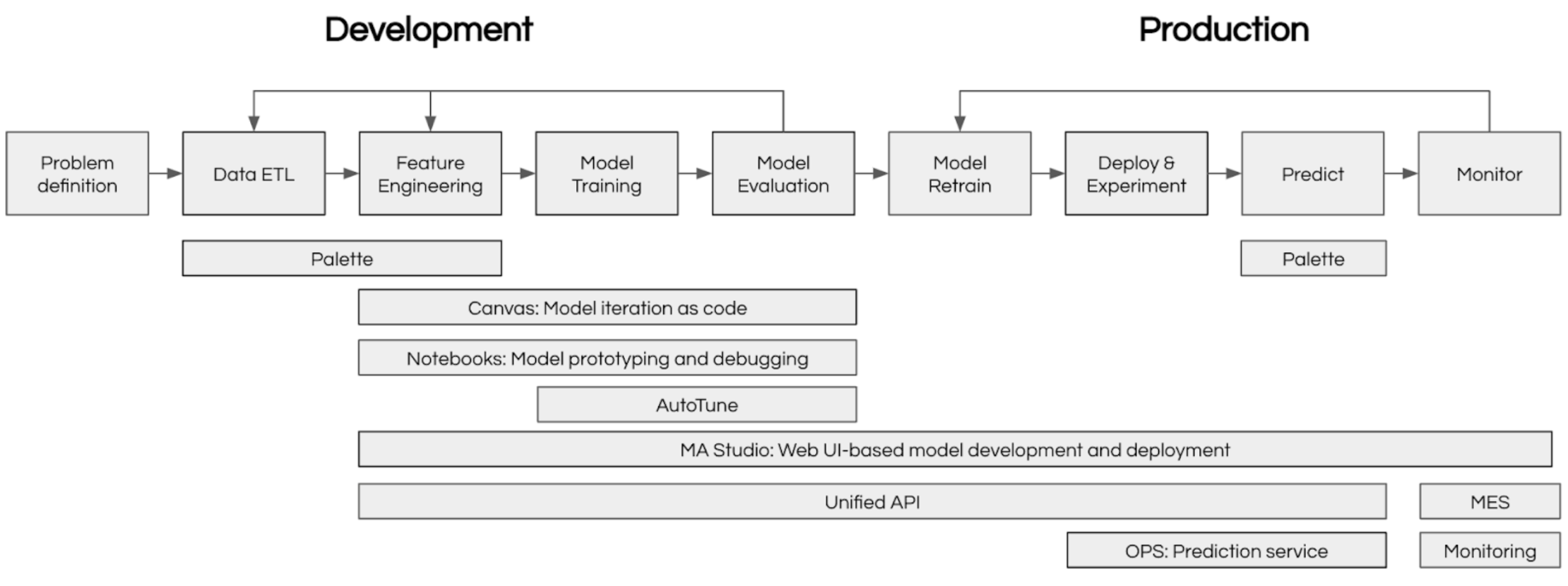
Machine Learning at scale requires coordinating many moving parts: data preparation, experiment tracking, model training, deployment, and monitoring. Michelangelo provides an integrated ecosystem that handles all of these concerns, enabling teams to focus on building great models rather than managing infrastructure.
The diagram below shows how Michelangelo’s components work together:
Frequently Asked Questions
Getting Started
Q: Do I need to learn a new framework to use Michelangelo? A: No. If you're using the UI, it's entirely point-and-click. If you're coding, Michelangelo uses familiar tools:
- Python for model code (PyTorch, TensorFlow, scikit-learn, XGBoost all work)
- Ray for distributed computing
- Standard data formats (Parquet, CSV, JSON)
- Decorators (
@uniflow.task,@uniflow.workflow) to integrate your existing code
Q: Can I use my existing Python ML code?
A: Yes! Wrap your training functions with @uniflow.task() decorator and you're ready to go. Example:
@uniflow.task()
def train_model(data_path: str):
    # Your existing training code here
    model = train_my_model(data_path)
    return model
Q: How do I migrate from my current ML stack? A: Start small:
- Pick one model to migrate (not your most critical one)
- Use Michelangelo's data prep → training → deployment workflow
- Compare results with your existing pipeline
- Gradually migrate more models as you gain confidence
Data & Features
Q: Where does my training data come from? A: Multiple sources:
- Upload CSV/Parquet files directly to the plugged-in storage
- Connect to data warehouses (Snowflake, BigQuery, Redshift)
- Use Spark/Ray for large-scale data processing
- Reference existing datasets in Michelangelo's data catalog
Q: Can I use feature stores with Michelangelo? A: Yes, Michelangelo integrates with feature stores or you can manage features within the platform using the data prep pipelines and inference.
Q: What data formats are supported? A: Parquet (recommended). CSV, JSON, Avro. For custom formats, use Uniflow tasks to handle data loading.
Training & Deployment
Q: What compute resources are available? A: Michelangelo provides:
- CPU-only instances for lightweight models
- Single-GPU instances (V100, A100) for deep learning
- Multi-GPU clusters for distributed training
- Ray clusters for data-parallel and model-parallel training
Q: How long does it take to deploy a model? A: Deployment time varies:
- Online inference: ~5-10 minutes (container build + rollout)
- Batch predictions: Immediate (scheduled jobs)
- Testing in sandbox: <2 minutes
Q: Can I do A/B testing? A: Yes. Deploy multiple model versions to the same endpoint with traffic splitting. Monitor metrics per variant and gradually shift traffic to the winner.
Q: What happens if my model training fails? A: Uniflow automatically:
- Retries transient failures (network issues, spot instance preemption)
- Preserves logs and intermediate outputs for debugging
- Sends notifications (email, Slack) on terminal state
Monitoring & Operations
Q: How do I monitor model performance in production? A: Michelangelo provides:
- Model Excellence Scores tracking accuracy, latency, throughput
- Data drift detection comparing training vs. production distributions
- Custom metrics you define and track
- Alerts when metrics degrade beyond thresholds
Q: Can I roll back a model deployment? A: Yes, instantly. Every deployment is versioned. Click "Rollback" in the UI or use the CLI:
ma deployment -f <deployment spec contains the desired model revision>
Q: How do I debug predictions? A: Multiple approaches:
- Request tracing: See exact features used for a specific prediction
- Batch debugging: Run model on test inputs via UI
- Local testing: Pull deployed model and run locally with same inputs
Cost & Scaling
Q: How does Michelangelo handle scaling? A: Automatically:
- Online inference autoscales based on request volume
- Batch jobs use spot instances for cost savings
- Ray clusters elastically scale workers based on workload
Q: What if my dataset doesn't fit in memory? A: Use Michelangelo's Ray integration for out-of-core processing. Data is streamed from storage (S3, HDFS) and processed in chunks.
Collaboration & Governance
Q: How do multiple team members collaborate? A: Michelangelo provides:
- Shared projects with role-based access (viewer, editor, admin)
- Model lineage tracking who trained what and when
- Version control for models, datasets, and pipelines
- Comments and annotations on experiments and deployments
Q: Is my data secure? A: Yes. Michelangelo enforces:
- Role-based access control (RBAC)
- Encryption at rest and in transit
- Audit logs for all operations
- Compliance with SOC 2, GDPR, HIPAA (depending on deployment)
Q: Can I use Michelangelo for regulated industries (healthcare, finance)? A: Yes, with proper configuration. Michelangelo supports:
- Data residency requirements (region-specific storage)
- Audit trails for model decisions
- Explainability tools for model interpretability
Still have questions? Check out our documentation, join the community forum, or explore the user guides.
What's next?
- Ready to build? Set up your local sandbox and follow the Getting Started with Pipelines guide (~30 min)
- Want to understand the concepts first? Read Core Concepts and Key Terms
- Looking for examples? Browse end-to-end tutorials covering XGBoost, BERT, GPT fine-tuning, and recommendation systems